⚡ Ship your first selling SAAS in minutes
In this article we'll set up everything, create landing page & start receiving payments from clients.
Setting up the project
Firstly, make sure to clone the project & set up environment variables in .env file (See instruction)
Then, search for all "_*: " in the VS Code through all files to get all the required actions for the website.
Then search for "_**: " (two **) to get non-mandatory actions.
Launch the website using npm run dev and you're all set! ✅
Access the website at localhost:3000/
Building the landing page
Once you've started the script using npm run dev, you will see the starting section:
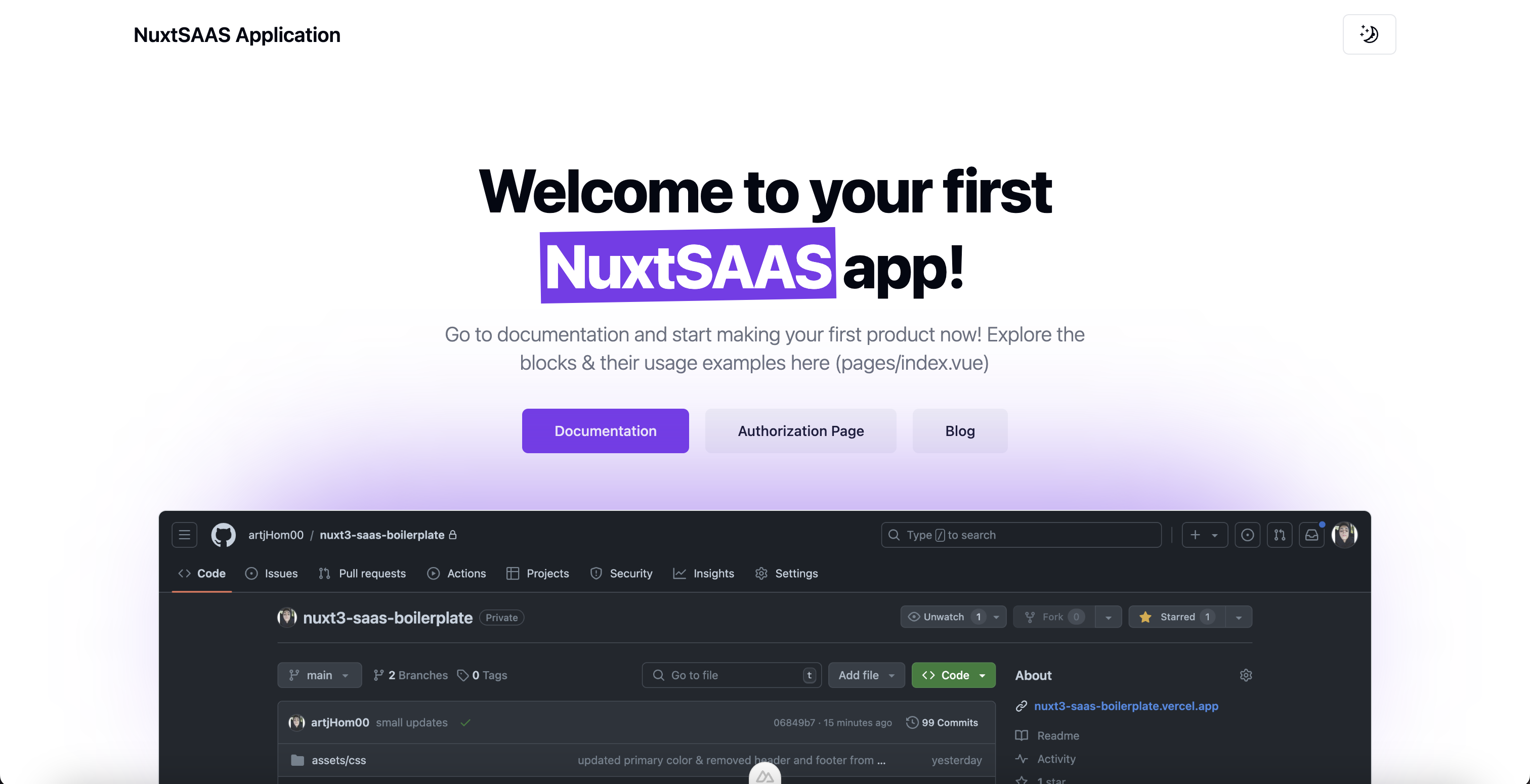
Copy the code below into your /pages/index.vue file, to create a fully functional & selling landing page.
Fill it with contents as you want.
<script setup lang="ts">

import LandingHero from '@/components/blocks/landing/landing-hero/LandingHero.vue';
import LandingSection from '@/components/blocks/landing/landing-section/LandingSection.vue';
import LandingTestimonials from '@/components/blocks/landing/landing-testimonials/LandingTestimonials.vue';
import LandingQuote from '@/components/blocks/landing/landing-quote/LandingQuote.vue';
import LandingFAQ from '@/components/blocks/landing/landing-faq/LandingFAQ.vue';
import LandingCTA from '@/components/blocks/landing/landing-cta/LandingCTA.vue';
import LandingPricings from '@/components/blocks/landing/landing-pricings/LandingPricings.vue';
import { type ButtonProps, type TestimonialProps, type PricingPlanProps, type AccordionItemProps } from '@/components/blocks/types';

definePageMeta({
    layout: 'default'
});

const heroButtons: ButtonProps[] = [{
    title: 'Documentation',
    size: 'lg',
    link: {
        url: '#pricings'
    }
},
{
    title: 'Authorization Page',
    size: 'lg',
    link: {
        url: '/auth',
    },
    variant: 'secondary'
}, {
    title: 'Blog',
    size: 'lg',
    link: {
        url: '/blog',
    },
    variant: 'secondary'
}]

const heroHeading = {
    title: 'Welcome to your first *NuxtSAAS* app!'
}
const heroDescription = {
    title: 'Go to documentation and start making your first product now! Explore the blocks & their usage examples here (pages/index.vue)'
}

let heroImage = {
    url: '/images/github-dark.png'
}

const CTAButton: ButtonProps[] = [{
    title: 'Get Started',
    link: {
        url: '#pricings'
    }
}]

const features: string[] = ['Continuous integration and deployment', 'Development workflow', 'Knowledge management']

const testimonials: TestimonialProps[] = [{
    person: {
        name: 'Customer #1',
        description: '@customer1'
    },
    content: "Using this service has been a game-changer for my business. The automation and efficiency it brings are unparalleled. <span>Highly recommend it!</span>",
},
{
    person: {
        name: 'Customer #2',
        description: '@customer2',
    },
    content: `I've tried several similar platforms, but none compare to this one. The user experience is seamless and the support team is always there to help. Kudos to the team!`,
},
{
    person: {
        name: 'Customer #3',
        description: '@customer3'
    },
    content: `This service has significantly reduced the time I spend on manual tasks. It's reliable, fast, and incredibly easy to use. A must-have for any business owner.`,
},
{
    person: {
        name: 'Customer #4',
        description: '@customer4'
    },
    content: `The integration process was smooth, and the benefits were immediate. I can't imagine going back to the old way of doing things. Highly efficient and user-friendly.`,
},
{
    person: {
        name: 'Customer #5',
        description: '@customer5'
    },
    content: "Fantastic service! It's intuitive and has saved me countless hours. The support team is also very responsive and helpful. Highly recommend!",
},
{
    person: {
        name: 'Customer #6',
        description: '@customer6'
    },
    content: `This platform is a real lifesaver. It's easy to use, and the results are consistent and reliable. <span>It has made my job so much easier.</span>`,
},
{
    person: {
        name: 'Customer #7',
        description: '@customer7'
    },
    content: "I've seen a noticeable improvement in my workflow <span>since I started using this service.</span> It's fast, reliable, and the customer support is top-notch. Absolutely recommend it!",
},
{
    person: {
        name: 'Customer #8',
        description: '@customer8',
    },
    image: {
        url: '/images/placeholder.png',
    },
    content: `Switching to this platform was the best decision for my business. The automation features are fantastic, and the customer support is exceptional. It has truly made a difference in our daily operations.`,
}]

const accordionItems: AccordionItemProps[] = [
    { value: 'item-1', title: 'How do I get started with the platform?', content: "Getting started is easy! Simply sign up for an account on our website, follow the on-screen instructions to set up your profile, and you'll be ready to explore and utilize all the features our platform offers." },
    { value: 'item-2', title: 'Is customer support available if I encounter any issues?', content: 'Yes, our dedicated customer support team is available 24/7 to assist you with any questions or issues you may have. You can reach us via live chat, email, or phone, and we\'ll be happy to help.' },
    { value: 'item-3', title: 'What security measures are in place to protect my data?', content: 'We take data security very seriously. Our platform uses advanced encryption protocols, regular security audits, and strict access controls to ensure your data is safe and secure at all times.' },
]

const pricingPlans: PricingPlanProps[] = [{
    heading: 'Starter',
    subheading: 'Best option for personal use & for your next project.',
    pricing: {
        actual: '$29',
    },
    period: 'year',
    features: ['Individual configuration', 'No setup, or hidden fees', 'Team size: 1 developer', 'Premium support: 6 months', 'Free updates: 6 months'],
    action: {
        title: 'Get started',
    },
    // **paste your product's payment link here (create in the product page of stripe's dashboard)
    paymentLink: 'https://stripe.com',
}]

</script>

<template>

    <div>

        <LandingHero :description="heroDescription" :image="heroImage" :heading="heroHeading" :buttons="heroButtons"
            align="center" />

        <LandingSection :buttons="heroButtons"
            description="Deliver great service experiences fast - without the complexity of traditional ITSM solutions. Accelerate critical development work, eliminate toil, and deploy changes with ease"
            :features="features" />

        <LandingTestimonials :testimonials="testimonials" />

        <LandingQuote
            content="Whether you're a small business owner looking to streamline operations or a large enterprise aiming for efficiency, our platform offers intuitive solutions and robust features that cater to everyone's needs."
            author="Micheal Gough" aside-info="CEO at Google" />

        <LandingFAQ :accordion-items="accordionItems" heading="Frequently asked questions"
            subheading="Find answers to the most common questions about our services, features, and support." />

        <LandingCTA heading="Get the product right now!"
            subheading="Try our product for 30 days. No credit card required." :buttons="CTAButton" />

        <LandingPricings id="pricings" :pricing-plans="pricingPlans" />

    </div>

</template>
❗ Make sure to create a new product in Stripe dashboard & replace the "paymentLink" with the actual product's payment link. Then set up the webhooks so that new clients could register on the website once paid.
Deployment
Use the Deployment instruction to deploy your project live on Vercel and you're good to go